Sony LANC

The Sony LANC protocol is a serial control interface found on a wide range of Sony camcorders and cinema cameras. It connects to the Cyanview CI0 or RIO via the dedicated LANC port using a CY-CBL-6P-LANC-03 cable. LANC control is commonly used for tally and menu navigation on cameras that lack full IP or serial remote control, and can be combined with other protocols for a complete shading setup.
Supported Models
- All Sony camcorders with LANC connector — PXW-FS5, PXW-FS7, PXW-Z90, and others
- Sony ILME-FX6 — LANC is the only way to access menu navigation and tally; other controls are handled via IP
A list of compatible older Sony cameras (including tally support per model) is available on Sony's website: RM30BP compatibility.
Supported Controls
| Control | Notes | Sony LANC |
|---|---|---|
| Iris | ✔ | |
| Gain | Dial must be mapped to Gain — see Camera Configuration | ✔ |
| Shutter | ✔ | |
| ND Filter | ✔ | |
| White Balance | AWB / ATW | ✔ |
| Lens — Zoom | ✔ | |
| Lens — Focus | ✔ | |
| Record | REC key press | ✔ |
| Menu Navigation | Menu and Fn button key presses | ✔ |
| Tally | Not supported on all models — check RM30BP compatibility list | ✔ |
LANC control is unidirectional — it only sends key presses and is relatively slow. The RCP will not display any camera status feedback.
Connection
The LANC camera connects directly to port 2 of the CI0/RIO LAN (local) or RIO WAN (local or remote).


Required Accessories
Required:
- CY-CBL-6P-LANC-03 — CI0 / RIO port 2 to camera LANC connector
Optional:
- CY-CBL-6P-PWR — For driving a tally LED from an unused CI0 / RIO port on cameras without built-in tally support
Configuration
Camera Configuration
Map the camera's dial to Gain to enable gain control from the RCP.
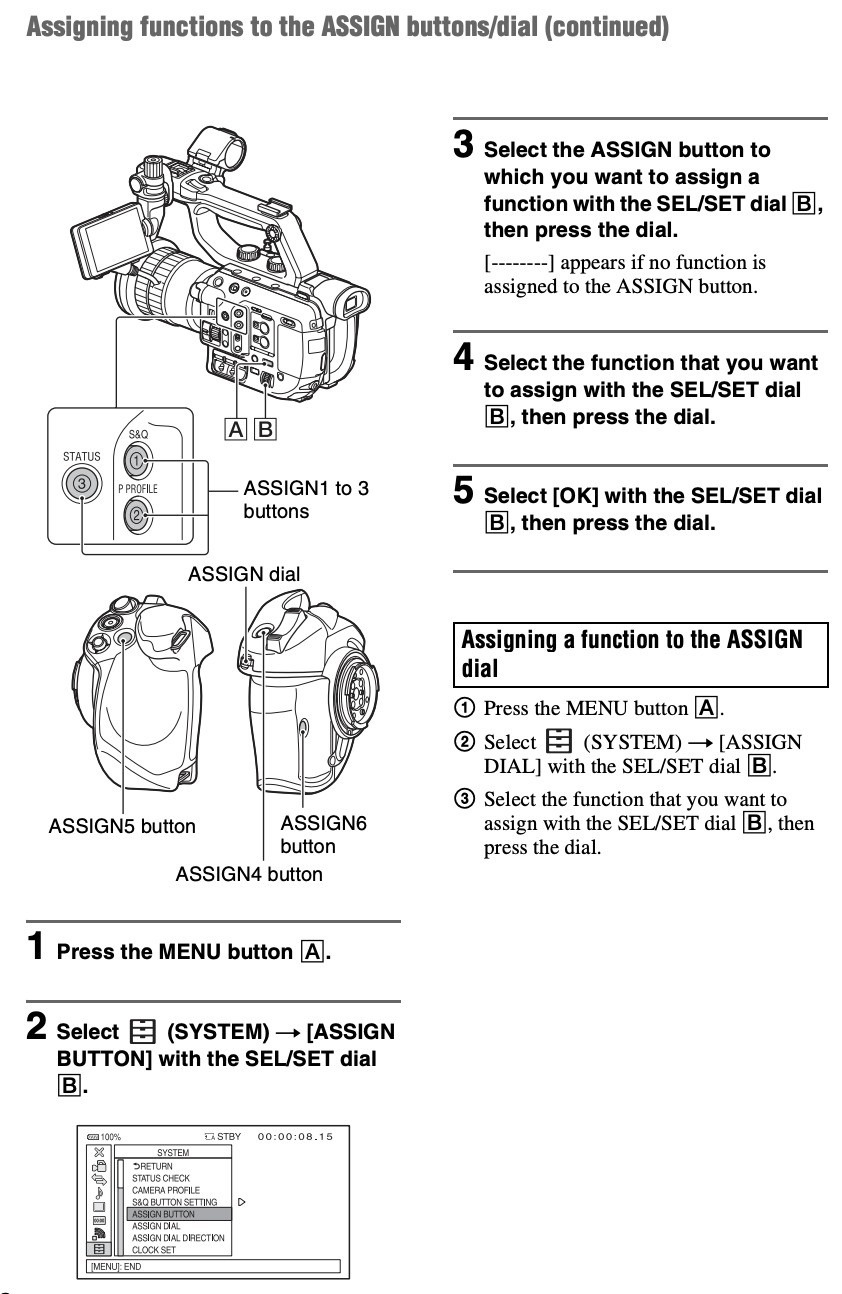
Both the Sony RM30BP and the Cyanview gain control act on the dial-mapped function.
- If the dial is mapped to Gain, the Cyanview gain control acts on Gain.
- If the dial is mapped to Variable ND, the Cyanview gain control acts on Variable ND.
RCP Configuration
This is a serial camera — follow the Serial Camera Setup Guide to add it to the RCP.
Camera-specific settings:
- Select brand Sony
- Select model LANC
- Select the CI0 / RIO the camera is connected to (only port 2 is shown)
Operations
Advanced Shading
You can combine LANC camera control with a LUT box / color corrector for extended shading.
Coupling your setup with a VP4 enables multi-matrix and extended shading capabilities (detail, coring, etc.) beyond what a typical LUT box provides.
Tally
Tally is not available on all Sony LANC cameras. Some models support tally in the viewfinder; others do not. Check the RM30BP compatibility list and search for "tally" to verify your model.
For cameras without built-in tally, an unused CI0 / RIO port can act as a tally output using a CY-CBL-6P-PWR to drive a tally LED. See the Tally configuration page.
External Lens Control (RIO)
Iris control is also possible via the Lens block on the RCP:
- For a Fuji or Canon motorised lens, follow the cine lens guide.
- For a non-motorised lens, you can integrate Tilta motors.
Troubleshooting
Camera icon stays RED / camera not detected
Check in this order:
- Verify port — confirm the camera is connected to port 2 of the CI0 / RIO (LANC is only supported on port 2).
- Check the cable — ensure you are using a CY-CBL-6P-LANC-03 cable, not a different cable type.
- Power cycle — restart the camera and retry.
- Verify model selection — confirm Sony / LANC is selected in the RCP camera configuration.
Tally not working
- Tally is not supported on all Sony LANC cameras. Check the RM30BP compatibility list for your model.
- For cameras without tally, use a spare CI0 / RIO port with a CY-CBL-6P-PWR cable as a tally output.
Gain control not working
- Verify the camera dial is mapped to Gain in the camera's assignable button settings (see Camera Configuration).
- Note that the Cyanview gain control always acts on whatever function the dial is currently mapped to.