Cyan Camera App
CyanCamera turns your phone or tablet into a camera source with manual sensor control, on-screen scopes, 3D LUT color, HDMI output, and low-latency streaming. It can be driven remotely from a CyanView gateway and RCP.
REMI vs. RCP: same remote-control system, two names. REMI is the protocol/connection used by the gateway; RCP is the panel an operator uses.
First time setup
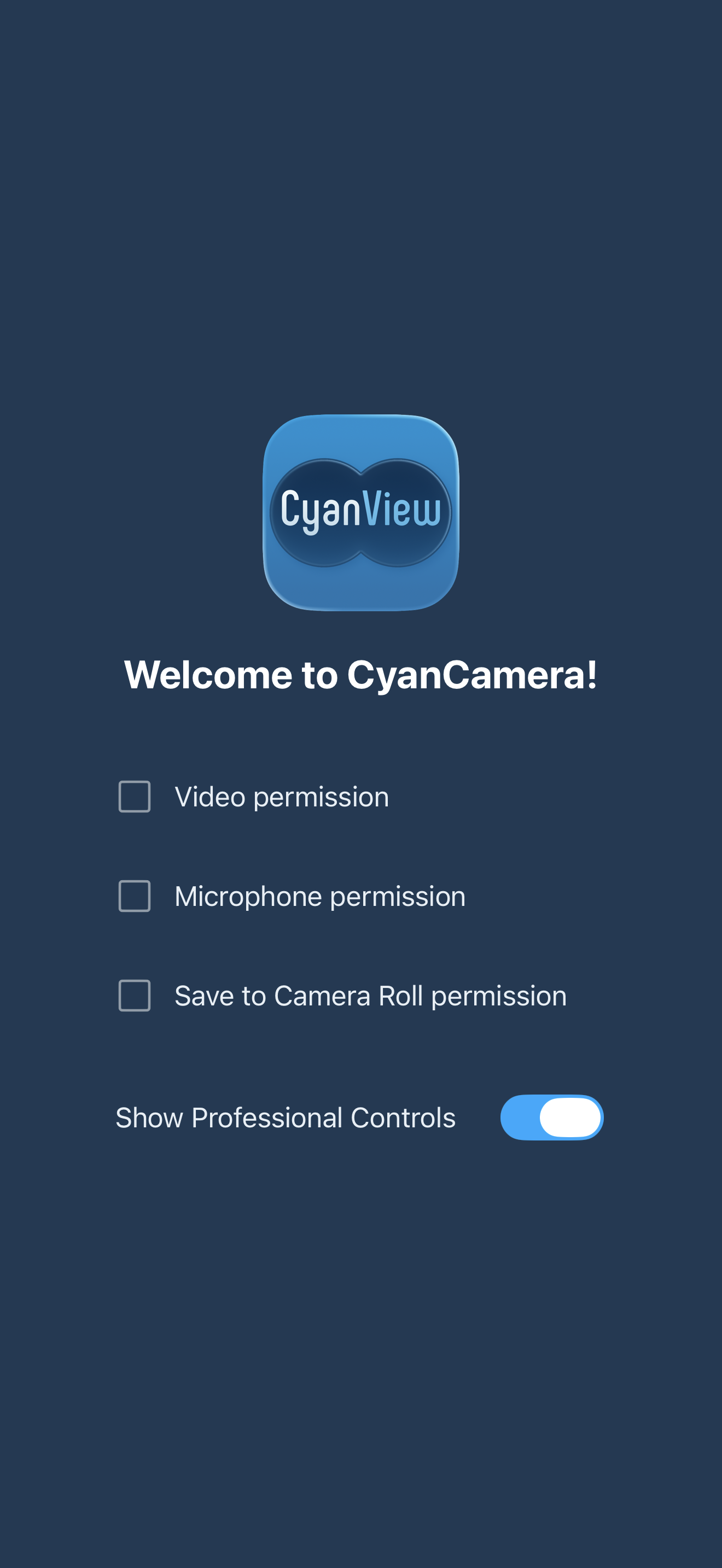
Grant all three permissions to start: Video, Microphone, and Save to Camera Roll. Tap each row and granted rows turn into a filled checkbox, then the app opens the camera. The Show Professional Controls toggle sets whether the full overlay is shown by default (changeable later in Settings).
Main controls
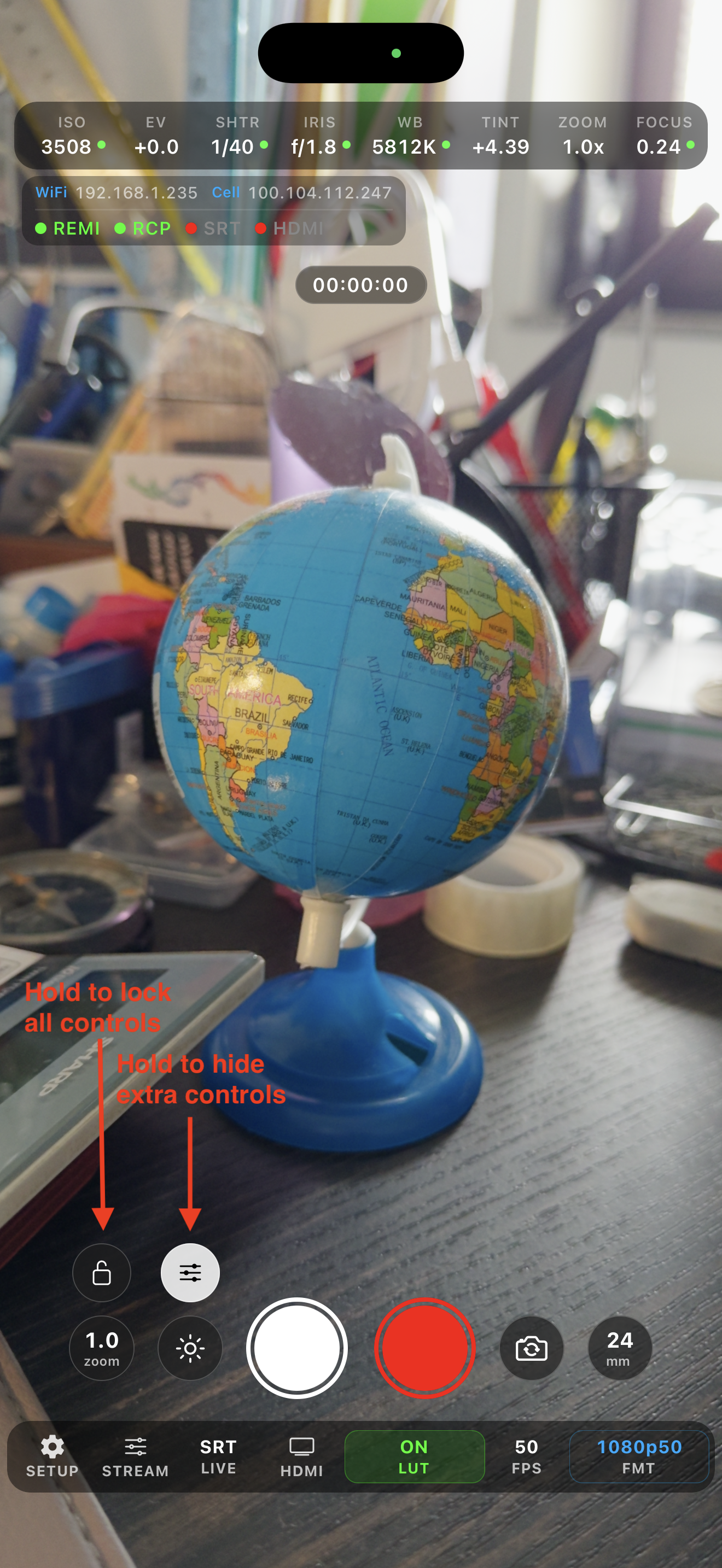
The live preview fills the screen with overlays that rotate to match orientation. Controls cluster around the center.
Right side:
- Record: red circle becomes a red square while recording
- Lens flip: switch front/back camera
- Lens switch: shows focal length (e.g.
24 mm); tap to cycle physical lenses (ultra-wide / wide / tele)
Left side:
- Photo: take a still
- Flash: torch on the back camera; screen-brightness "flash rim" on the front
- Zoom preset: tap to toggle 1×/2×
- Lock: hold ~1.5s to lock/unlock all controls
- Pro: hold ~1s to show/hide the professional overlay
Gestures: pinch to zoom (1×–10×); single tap to set focus/exposure point; double tap to clear it; long-press (~0.6s) to lock focus/exposure; vertical drag to adjust EV (±2 stops, up = brighter).
Settings
Open from SETUP:
- Camera Number: the number shown on the RCP
- Widgets: toggle scopes: RGB Histogram, RGB Parade, Vectorscope, Audio Levels
- Always Show Controls: keep the pro overlay visible without holding Pro
- Lock Horizontal: force landscape overlay
- Color Space Input: Rec. 709, P3 D65, Rec. 2020 HDR, Apple Log, Apple Log 2 (device-dependent; Apple Log needs iOS 17+)
- Stabilization: Off, Standard, Cinematic, Cinematic Extended, Preview Optimized, Enhanced, Low Latency, Auto
- Microphone: Auto, Built-in, or an external input
- HDMI Audio: on/off
- Recording: Bit Depth (Auto/8-bit/10-bit), Bitrate, Save Location (Photo Library or external folder)
- REMI: cloud relay to reach a gateway over the internet. Status, Camera Name, Tag, Region (Auto/EU/US/Manual), Host, Port (default 7887), Connect/Disconnect
Bottom toolbar
- SETUP: settings
- STREAM: stream settings
- LIVE: start/stop stream (green when live, orange while connecting)
- HDMI: HDMI output on/off (green when a display is connected)
- LUT: color screen; value shows the color state (
OFF,ON,Studio,RCP,ON+RCP,Studio+RCP) - FPS: current frame rate (read-only)
- FMT: tap to pick format: 1080p23.98, 1080p29.97, 1080p50, 1080p59.94, 1080p60, 4K30, 4K60 (locked while streaming)
Parameter bar and status
The top parameter bar shows ISO, EV, SHTR, IRIS, WB, TINT, ZOOM, FOCUS, each with a dot: green = auto, orange = manual, dim = unsupported. Tap a manual value to return it to auto.
The status pill shows the device IP (tap to copy) and indicators: REMI (gateway up), RCP (panel registered), RTP/SRT/WebRTC (with live bitrate), HDMI, battery, free storage, and clock.
RCP control
When the RCP sets a value, that parameter goes to manual mode and its dot turns orange. Tap the value (on the phone or RCP) to return it to auto.
RCP-controllable: ISO · EV · Shutter · Iris · White balance + tint · Lens · Zoom · Focus. The RCP can also toggle red tally (red border), start/stop recording, and report timecode.
RCP → Camera → Custom buttons:
- RTP / SRT / WebRTC: start/stop stream in that mode
- lens mm buttons: switch physical lens
- bit- / bit+: step stream bitrate ±0.1 Mbps
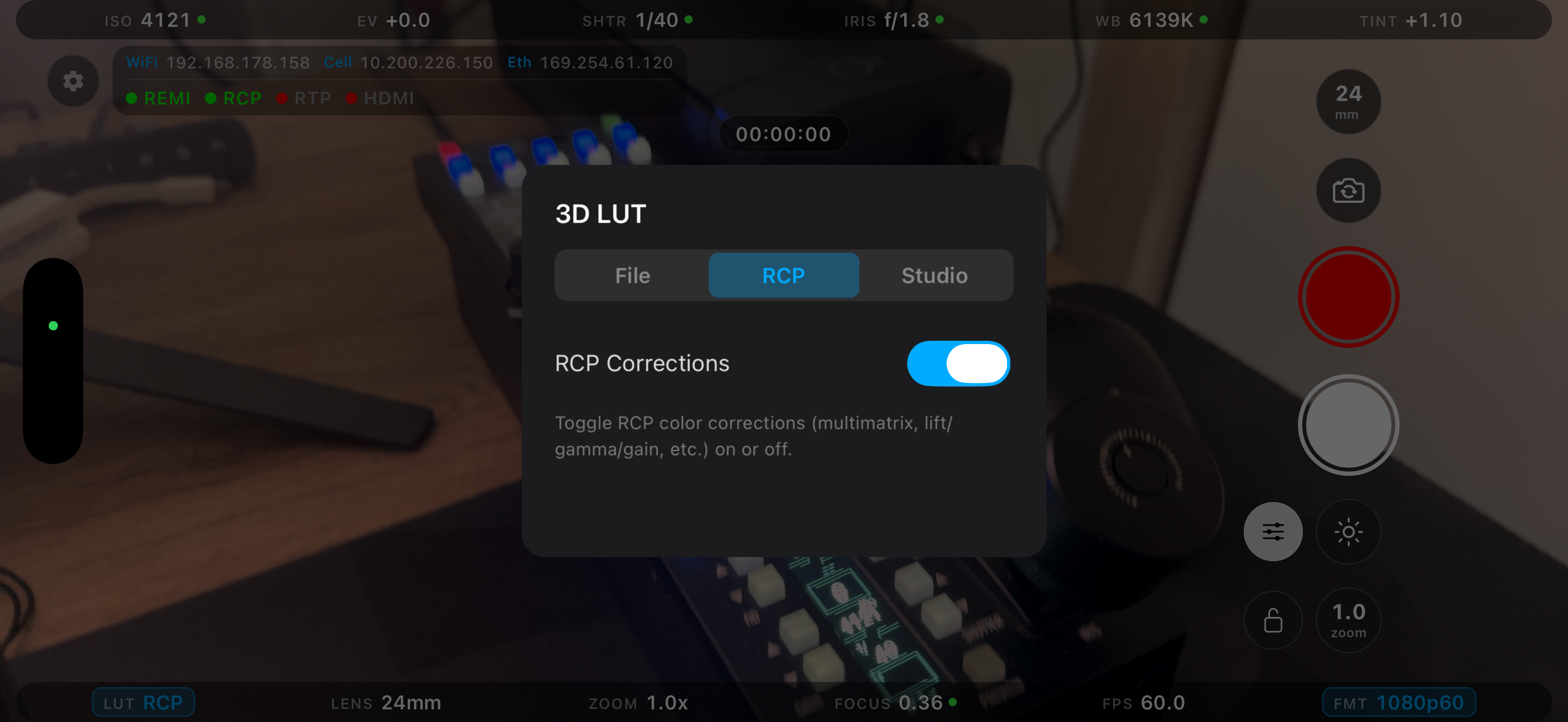
- CorrON / CorrOFF: toggle RCP color corrections
- RecToggle: start/stop recording
Color shading
Tap LUT to open the color screen (File / RCP / Studio tabs).
File tab:
- Master 3D LUT on/off
- LUT carousel: Off tile, bundled LUTs, imported LUTs (delete with "x"), and Add to import
- Select .cube File to import from your device; Clear LUT to remove
- Apply To: choose outputs. Monitor (preview + HDMI), HDR LUT (BT.2020/HLG), Record and Stream (padlocked; unlock to bake the LUT in). Record/Stream can't be changed mid-recording or mid-stream
- Chain with RCP Corrections: applies RCP corrections first, then the LUT (the
ON+RCPstate)
Two LUTs ship bundled: AppleLog_to_Rec709.cube and AppleLog2_to_Rec709.cube.
RCP tab: a single RCP Corrections on/off switch (synced with the CorrOn/CorrOff custom button). Supported corrections: White balance RGB · Gamma RGBM · Black RGBM · Master Black · Hue/Saturation · Multimatrix (16-vector).
Studio tab: let a studio push a LUT to the device. Turn on Accept studio pushes, then enter the shown IP and port into the studio's "Devices → CyanCamera" panel. Shows a listening status and the current pushed LUT.
Changing the active LUT while streaming is blocked in 8-bit color (Rec.709, P3), since it forces an encoder reconfigure. It's allowed in 10-bit (Rec.2020 HDR, Apple Log, Apple Log 2).
Streaming
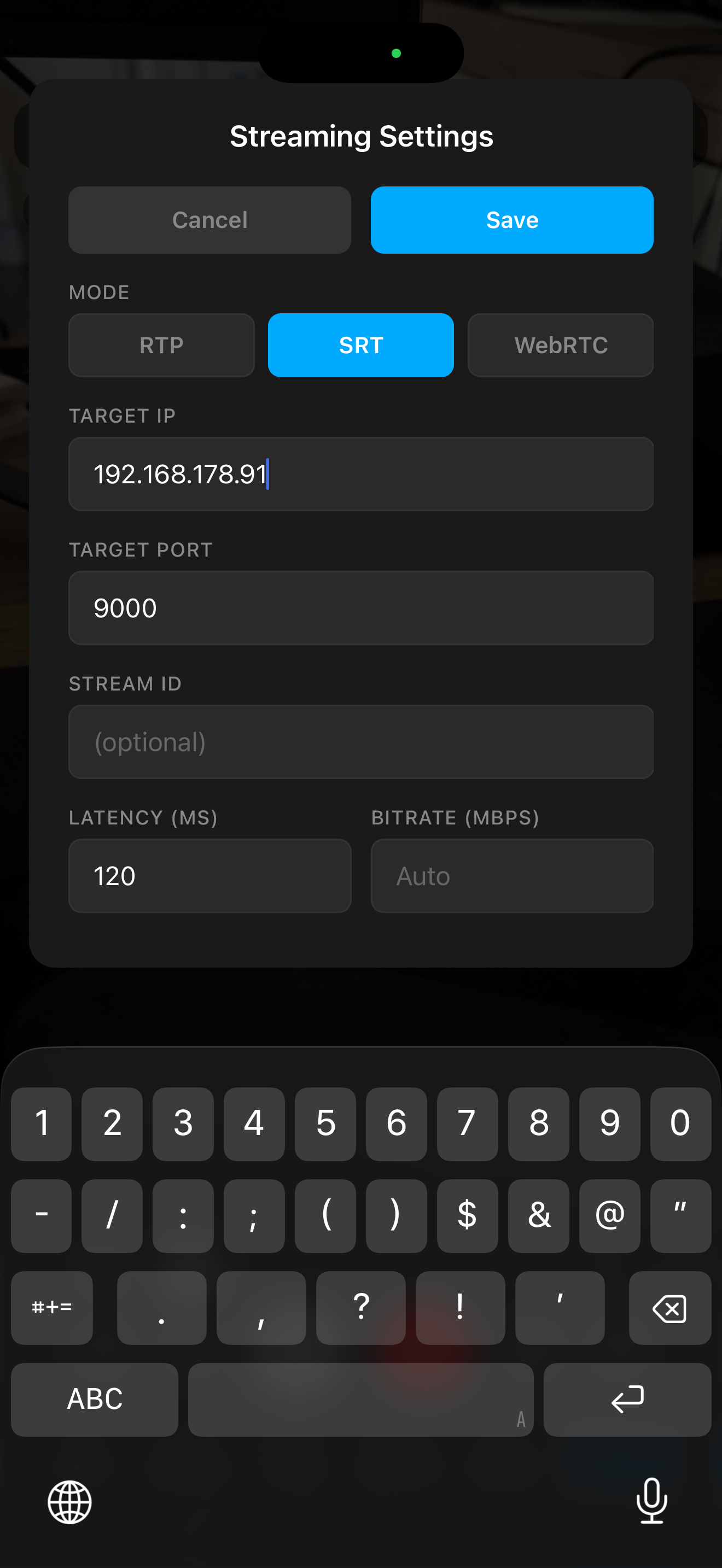
Protocols: RTP / SRT / WebRTC. Open STREAM for settings, configure, then Save. Start/stop from LIVE (or the RCP custom button).
- RTP: Target IP, Port (default 4444), Bitrate (blank = Auto), Codec (H.264/H.265), Bit Depth (Auto/8-bit/10-bit; 10-bit forces HEVC)
- SRT: Connect Mode (Caller/Listener), Target IP or bind address, Port (default 9000), Stream ID, Latency (default 120 ms), Bitrate, Passphrase, Codec, Bit Depth, Audio + Audio Bitrate, Auto Reconnect
- WebRTC: Boombox Server URL (
ws://…)
A warning appears if the source is Apple Log with no LUT active (receivers would see washed-out footage).
Receiver examples (require ffmpeg):
SRT server + preview:
srt-live-transmit "srt://0.0.0.0:9000?mode=listener" "udp://127.0.0.1:5000" & ffplay -i "udp://127.0.0.1:5000"
SRT server + HDR preview:
mpv 'srt://0.0.0.0:9000?mode=listener' \
  --hwdec=videotoolbox \
  --vo=gpu-next \
  --target-colorspace-hint=yes \
  --loop-file=inf \
  --keep-open=always \
  --idle=yes \
  --demuxer-thread=yes \
  --network-timeout=0
RTP server + preview:
ffplay -fflags nobuffer -flags low_delay -framedrop -probesize 32 -analyzeduration 0 -sync ext -protocol_whitelist file,udp,rtp -f sdp -i <(echo -e "v=0\nm=video 4444 RTP/AVP 96\nc=IN IP4 0.0.0.0\na=rtpmap:96 H264/90000")